Category Archives: User research

All-hands-on-deck …for rapid user insights

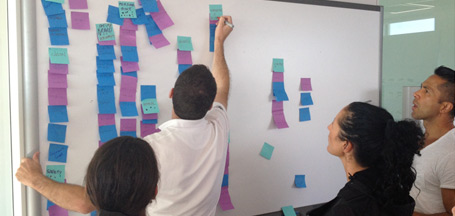
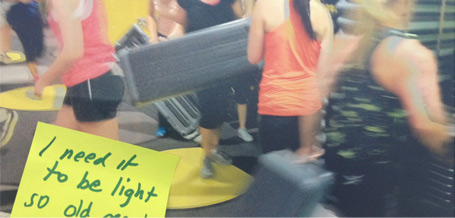
Taking notes form the user's point of view...This year I’ve surprised myself by recommending some super short approaches to user research.

When there’s no time, money or buy-in for a ‘full noise’ project I’ve been running a 2 day process where I put my clients in the research seat as they work together to make their own observations, draw their own conclusions and insights.

It felt risky and compromised at first, but it’s working out well so far.

Here’s how…..

(Once the objectives and scope are nailed down)

  • I invite stakeholders to attend and observe interviews with customers.
  • I set the stakeholders up to take notes.
  • Then facilitate interviews with paid participants.
  • Between sessions we gasp for breath and I draw out the top-of-mind observations from each stakeholder.
  • After the last session, I guide them through a hands-on exercise where they match and group individual observations into themes.
  • Together we agree on what these mean for the design/business and prioritise them into an action list.

This is a collaborative, intense and compressed way to work but has massive value to the client. … even if you are exhausted at the end of it.

Some things I’ve learned from working this way:

PLANNING:

Critically, this requires time investment and commitment from the stakeholder team – be crystal clear from the start that this is totally a ‘get out what you put in’ scenario. Participation is required if the client is going to see value.

It’s best to have a mix of stakeholders involved, different parts of the business, levels of seniority, familiarity with the product, market etc.

I can’t imagine doing it justice with less than 3 stakeholders.

Try to make this an off-site activity to minimise distractions.

Make sure food for them and you is arranged in advance. The sessions will be almost back to back so there will be no skipping off to lunch.

Recruitment – You should consider all-day ‘standby’ participants in case of a ‘no-show’.

THE SESSIONS:


Stakeholders need a strong briefing around observation. Reinforce that it’s a team effort, several stakeholders observing the same behaviour can take different meaning away – It’s all valuable.

Keep note taking physical and portable (paper / sticky notes).

Don’t be precious about format, it’s most important that notes are actually taken, not how.

Suggest notes are written from the customer’s point of view. This helps the stakeholder to think through what they are writing, and these ‘quotes’ really come to life during the analysis.

For a usability type project, you could have a sheet of paper for each participant with columns; Where, What and How – Where was the customer at, What did they say/do, How does it impact their experience.

Pinning the objectives up on the wall can remind observers what they are looking for.

Start a ‘discuss’ list and encourage observers to add items as they come up rather than talk through the session.

You need 5-10 mins between each session to conclude what was learned, what was confirmed etc. Asking each stakeholder to write down them share their ‘Top 5’ observations works well.

AFTER THE FINAL SESSION:

Aim for a 2 hour analysis and wrap-up.

Collate all the notes and get them up on walls, grouped by customer, topic etc.

Have everyone spend time (10-15 mins) scanning the data and writing down what they feel are key observations. Go for quantity. 100 is a good start.

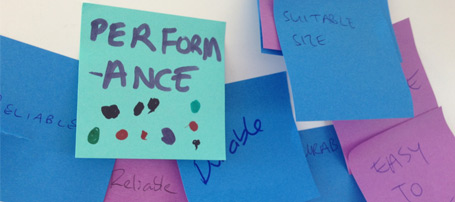
Go for some sort of ‘KJ’ collaborative analysis to group individual observations into themes. Name each theme and what it means for the product and customer.

Roll this into a prioritisation exercise by ranking / voting, plotting on a scale etc.
OUTCOMES FOR THE CLIENT:

Making decisions based on first hand observations is a powerful experience.

Getting answers in hours to questions which have been hovering for weeks is a liberating feeling for clients.

Clients arrive at conclusions and reach consensus and create the output together.

This approach can also show the client it’s something they can do themselves.

… and of course, questions emerge which they didn’t know they needed to answer.

Suddenly… where time, budget and buy in for customer research was lacking… it miraculously appears!

I was nudged over the fence into taking this approach by Dana Chisnell, so thanks Dana for the nudge!

I’d love to hear other people’s experience with this…
In another blog post I’ll tell you how it goes when you send the stakeholders out into the field to do their own research.
Ethno-unpacked – A design research toolkit.

Design research toolkit(UPDATED Feb 2016)

Every band needs a manager and a ‘roadie’. The manager books the gigs – The roadies set the stage so the band can focus on playing the gig. Between them, they’ve usually got a big truck full of kit, and lots of gaffer tape.

With design research (contextual inquiry or ethnography, if you like), there’s an amount of planning and kit required too. When running in-home interviews I need to play  both manager and roadie roles, but isolate these activities as much as possible from my role as researcher.

Every minute spent with a customer is valuable, so I can’t afford to be distracted by practicalities like recording equipment and timings.

After a few years experimenting with these practicalities I’ve arrived at a ‘toolkit’ of things in my backpack, so when I pull up at the customer’s house the ‘roadie’ can take a back-seat and let me get on with capturing the insights.

Here’s what’s in my bag:

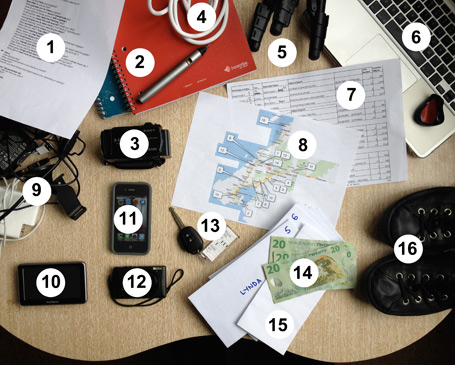
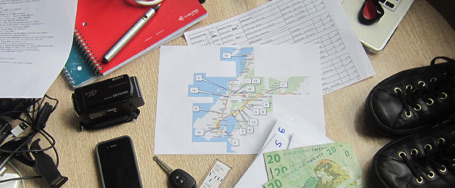
The contents of my bag when I hit the road on an ethnography / contextual inquiry / design research

1. Discussion guide. I try to keep this to a one pager with topic areas rather than ‘script’ like questions. I have the research objectives embedded in my curiosity, so by the time the first interview kicks off, this serves as prompts only. As you can read in my article: ” To uncover the story, first lose the script”, I’ll be completely free-styling after the first few interviews.

2. Livescribe Pen & Paper. Records every word and lets you playback what was said when you took notes or sketched. Here’s a detailed article about how I use a smartpen to free my mind and eyes during user research.

I tape spare ink refills to the book, as they run dry with no warning after about 50 pages. I use the display on the pen for timing – it’s less obvious and distracting to check the time on here than glancing at your phone. If a subject seems interested in the pen (or any technology you use) take the time to explain what it does and why you use it, this removes the distraction, so you can get on with it.

When I can’t use the pen,but know I need to record, I use  ‘Highlight’, a great iphone recorder app, with ability to add ‘moments’ just by tapping the screen… It’s very discreet. Olympus and Sony voice recorders also let you ‘highlight’ moments in recordings, but they are not so discreet.

3. Video camera.
I’ve tried many many cameras and always come back to a handycam with accessories.
Everything else has compromises in battery life, audio quality, zooming etc.

I use a Sony, with a stack of SD cards and a Sennheiser shotgun microphone – I find audio is more important than video quality.
A wireless lapel mic is essential when you want to cut out all the noise except the person you’re interviewing, or you’re in a sensitive context (like a hospital ward project I worked on) where the subjects may tend to whisper. I use a Sony ECM-AW4
I also have a beast of a battery on there, which can do a whole day of fieldwork on one charge, which has made #4 below obsolete.

4. Extension cord.  I used to carry this but opted for bigger batteries for the video camera. They are pricey, but essential.

5. Tripod. I carry a Gorrillapod SLR tripod with a Manfrotto ball mount and quick release, it’s compact, instant to set up and perfect for tabletop work. When you need to ‘walk and talk’ with someone, it’s a snip to just grab and use as a handle.

When I need the camera to be further out of the conversation, I go with an entry-level Sony tripod. It’s discreet, is smaller when folded than higher quality ‘mini’ tripods, goes up to about 1.2m high. I sort this out with the same quick release mount for the camera so there’s no screwing things on and off while you’re with the participant. This comes in handy

6. Laptop. I use this immediately after sessions to type up my reflections while they are still fresh. I always drive a bit down the road first …best they don’t see you frantically typing about them from behind their curtains.

7. Schedule. Who, When, Where and sometimes demographics; age, segment, occupation etc. I usually have a pared down version on the dash, but the full version stashed away in case I need phone numbers etc. This is a part of how I maintain my curiosity.

8. Map. As well as Google Maps I try to have a hard copy with all participants located, named, numbered and timed. This comes into it’s own in a city you’re unfamiliar with, when there’s a change in the schedule and you need to know whether you can actually shoehorn in a replacement participant and make it from A-B in the timeframe.

9. Cables, chargers etc. Including 12V in-car USB for boosting phone and livescribe pen while driving.

10. GPS / Satnav. Yes, I can use my phone, but sometimes I prefer a dedicated tool for the job, leaving my phone free for other things. I input all the addresses with names the night before. So when I arrive, the Satnav will tell me ‘arriving at ‘Daves’ number 26′. Geeky I know, but this really helps.
Yes. I make sure I delete all this data before handing it back to the rental co.

11. Smartphone. I use Alarm clock for when I can’t afford to run over the allotted time in a session, Voice to text to brain-dump my thoughts while driving between sessions, Camera for improptu shots, Messaging for contacting participants for timing / directions etc. and ‘Highlight’ for recording those moments.

12. Stills camera. As unobtrusive as possible. Must be usable by ‘feel’ alone (real buttons) and with one hand, so I can maintain my connection and focus while snapping away. Good as a secondary video camera too. I use a Canon S120

13. Rental car. Small & discreet – depending on the context, I sometimes park round the corner or out of sight of the address and appear to arrive on foot. …unless I’m in a rural area.

14. Cash incentives. In marked envelopes – for the participant’s time and involvement. Folding cash speaks everyone’s language – I avoid vouchers or direct payments. I always pay the participant at the start of the session and reinforce that it’s a payment for their time, not ‘for saying the right things’.

15. Receipts / NDAs. To be signed by participant. This keeps accountant and lawyers happy. I always include permission to video record session and detail the rights of use.

16. Smart/casual clothes. I dress up or down a bit depending on the topic I’m working with and neighbourhood I’m visiting – Dress smart enough to be credible, but not authoritative or superior in any way.

And the most important tools of all…

2 eyes

2 ears

1 mouth

…but I’m all ears if you’d like to add to my list, or suggest how I might adapt for different contexts?

Customer insight from… the Yellow Pages

The dull thud of a phone book hitting the desk. …Probably not a sound you’ve heard since the 90’s, but the humble yellow book, and it’s smaller, newer, blue cousin can be useful to explain the value of customer insights, especially those gathered in context…

20 years ago when the Thomson Directory went into battle with the ubiquitous Yellow Pages in the UK they wanted a point of difference – and to become the ‘most reached for’ directory over their competitor…

…By visiting people’s homes they saw the Yellow Pages not only next to the phone, but in drawers, under stairs, propping up computer monitors etc. Importantly, they noticed peoples’ behaviour – They stacked smaller books on top of  larger books.

Thomson used these behavioural insights to their advantage, producing a smaller book so it would sit on top, and be the first directory people grabbed.

The purpose, function and content remained unchanged, but a practical human behaviour sparked this significant change in the design and form factor of their product.

I’m not sure there’s a digital equivalent to ‘stacking’ items like this… but can you think of other products or services which have been shaped so fundamentally by behavioural insights?

Thanks Simon in London for the photos

…and to Ofer Deshe who told me the story a few years back.

Tool tips – When should design explain itself?

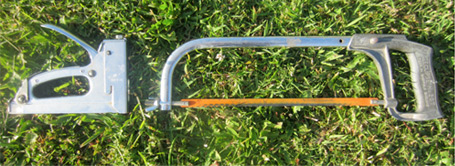
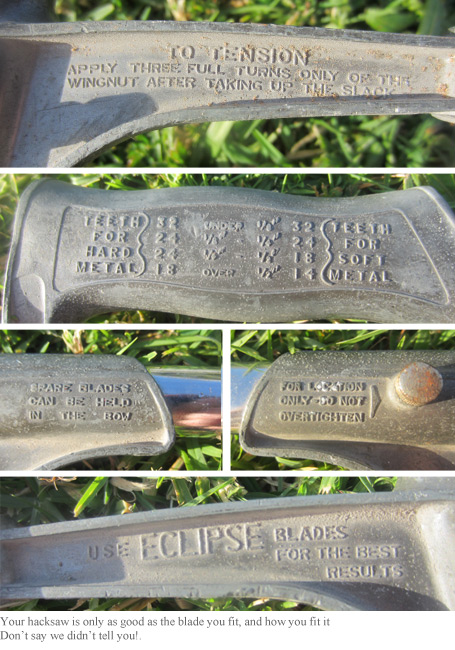
My Hacksaw and Stapler basking on the lawn

Should a hacksaw or staple gun need a manual?

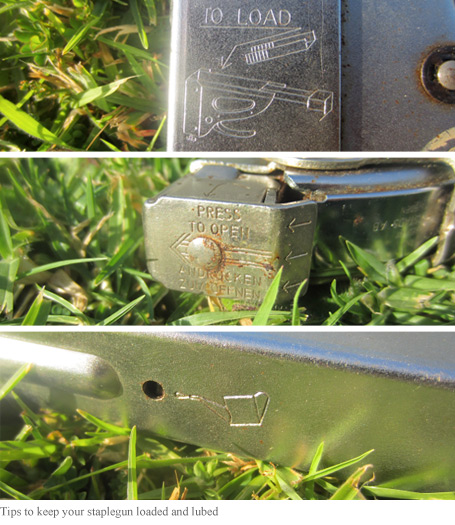
Mine have permanently moulded instructions to help get the most out of using them.

Handy hints built into my stapler

This hacksaw pre-dates the internet by 20 years, but look at all those tool tips!

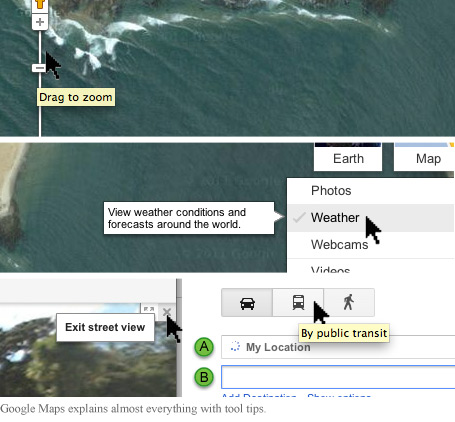
This sort of thing has become commonplace in the digital world too. Hover your cursor over any button or tool  and you’ll see prompts, tips, guidance, explanation etc. as you explore and use websites, software and devices.

Tool tips could help you find this remote New Zealand surf spot

Whether you’re using software or a saw and need that extra ‘tool tip’ …you’re generally alone, doing your own thing … so what about when you’re around other people… Can we learn by watching others?, does the ‘how to’ of using things travel by osmosis in a social or group situation? or, in other words – do people become the tool tips?

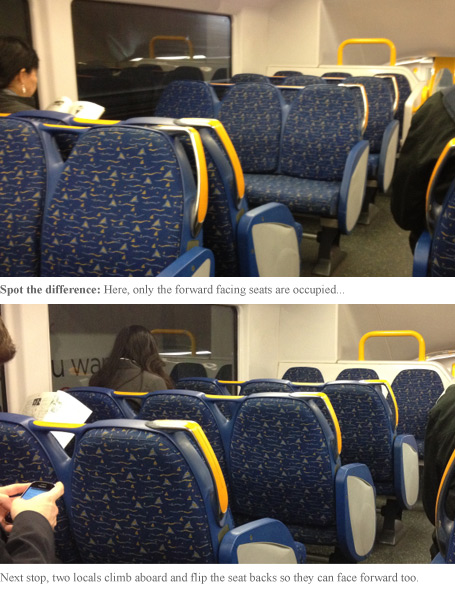
In the physical world, it seems this is true, as I noticed on a Sydney train recently.

These Sydney train seats can be switched to face either direction

You could argue the train seats should have a ‘tool tip’ to show that they can be reversed, but there’s also something satisfying about discovering it for yourself, or through watching others.

…My latest UX research project is for a multi-user ‘touch table’ designed for an exhibition space. The content is navigated by individuals and groups with a similar emphasis on ‘discovering’ how to interact with the environment, rather than being signposted at every step.

Often things in the physical world help explain user behaviour in the digital world and I’m thinking this train seat scenario might be a good analogy… but despite how much more natural it feels to be facing forward when getting from A-B, few passengers actually do change the seating around…

So, I wonder…

  1. Would a visual cue take the satisfaction away for the few to improve travelling for the many?
  2. Do people suffer performance anxiety the first time they try to move the seat? (I waited until I had an empty carriage)
  3. Are those ‘in the know’ motivated to share what they’ve learned, or do they keep it to themselves?
  4. Are we more likely to make these ‘discoveries’ in the physical or digital world?
  5. Is it possible to move through a digital journey facing backwards?
  6. Is it more valuable to discover a feature by serendipity, or to learn by observation of others?

I’d like to hear of other scenarios where people learn how to interact with a product or service purely by watching others…

…Do you know of any?

Visualising UX research

I’ve never seen clients stand around a written report gesturing at various pages discussing their implications… but when this happens with a drawing, I really feel like my job is done.

A written report can be restrictive when working with rich, emotive material, so I often use visuals to communicate insights and what they mean to my clients.

The same drawings I use to help myself ‘see the wood for the trees’ can be a valuable tool for sharing findings and concepts.

Until recently I’ve produced these to a simple but polished level:

Polished visuals can extend beyond initial graphic impact to tell stories, build context, explain relationships and show processes.  Until now I’ve used these as part of a final deliverable as they can be absorbed in a fraction of the time it takes to read a report, are well circulated and fantastic for getting buy in.

…more recently I’m using sketches earlier in a project as a different kind of tool – a platform for discussion.

Although clients don’t always consider it up-front, consensus building can be a valuable outcome from customer research. Teams across design, product, marketing etc. often need to just ‘get on the same page’.

Bringing the voice of the customer, or insights from their behaviour alive with a simple cartoon and can really get people talking.

A polished deliverable always has it’s place but the pencil is getting a workout earlier in the process these days. I’ve realised different stages of a project require different styles of visual and by using the appropriate level of detail for the audience and the decisions they face at the time, they can be one of the most powerful tools in the box.

Update:
By popular demand I’ve put a few more examples on the ‘approach’ page of my design research consulting website. … and there’s a link there to request a fuller set.

Life or death usability

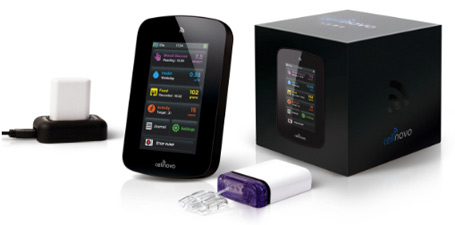
Over the last couple of years I’ve been lucky enough to be involved in the R&D programme for a ground-breaking medical device to help diabetics manage their insulin treatment.

Part of the project was to reach a regulatory milestone, which has now been achieved.

To reach this milestone we tested the usability of the device to prove it was intuitive and the design prevented people from giving themselves a mis-dose or even fatal dose of insulin.

It was amazing to work in this ‘high-stakes’ context with so many facets to the user experience:

  • an ‘out of box’ experience with crucial set-up to match the device to the user’s insulin sensitivity
  • a physical product which is injected with insulin and attached to the body
  • a touch screen device presents a learning curve for diabetics in their 70’s
  • online monitoring and visualisation of blood glucose levels – data presented in new ways
  • …and the big one… people’s health and lifestyle literally in their hands and plugged into their bellies.

Aside from having my eyes opened to the world of diabetes and being humbled by the courage of the people I met during the research, …it’s been so satisfying to see design research deliver such a tangible impact.

I worked in conjunction with London User Research Centre and with Design Science in Philadelphia.

Getting a Grip. Prodesign Magazine showcases my approach to UX

Design Research and User Experience article in Prodesign

This month I’m featured in Prodesign mag.

The article harks back to my days designing surfboards and the moment I became ‘hooked on usability’ during a project for Sony Playstation.

Read the Prodesign article ‘Getting a grip’ here as a PDF.

It turns out this is the last issue of this magazine after 16 years.

What does that say about design in New Zealand?

…or does it say more about print publishing?

Motivations. Delivered fresh to your door

I’m in London this month and just received a boxful of fresh produce from Abel&Cole.

Two things become very clear upon opening the veggie box;
They know who their customers are,
…and that
each customer has a different set of motivations to use the service.

A great example of this is in the friendly Spring magazine inside the box.

From a quick flick through, I’ve split out the content and some potential motivations Abel&Cole might be targeting in their customers.

  • Spring issue.  To know I’m eating what’s in season
  • Recipes.  To feel inspired
  • Large close up photos.  To feel close to the goodness
  • Place of origin.  To know where the food comes from
  • Names of growers.  To feel a connection to the source
  • Foodie person profile.  To feel I’m in good company
  • Tone of voice.  To know I’m dealing with down to earth people
  • Food facts.  To feel informed about what I eat
  • Animal welfare article.  To know that Abel and Cole cares
  • Green credentials.  To know I’m having lower impact on the planet
  • Eco focussed articles.  To feel part of a movement for good
  • Fitness related article.  To know I’m eating what’s right
  • Recipes on a budget.  To feel like I’m getting value
  • Photos of the staff.  To know who I’m dealing with

Only some of these are relevant to me, but I do see a pattern of :

To know’ and ‘To feel’

At first glance… about half of these appeal to the customer knowing they’ve made a good choice, the rest speak to their emotional motivations.

Abel&Cole have clearly done their research and spent a lot of time to deeply understand their customers. It shows in the way they’ve appealed to their motivations, peppering  emotional hooks and affirmations throughout the magazine.

I wonder though…

Does anyone actually read the magazine?
Does the usefulness of the content matter or is the message and motivational triggers behind it more important?
After thirty years in the vege business does this level of customer understanding come by default?
Perhaps Abel&Cole is a business which is by its ethical nature brimming with empathy for it’s customers?

How much of their intelligence and feedback comes through their social media channels?
To what extent do they use their delivery drivers to capture customer feedback?
Have I read too much into this?

As for the contents of the box …The veggies are all great, but as I discovered in a recent project,

It’s a lot more than just the fruit and veggies which can add goodness to the customer experience.

End to end customer experience for Swiftpoint

All too often, I’m working on one aspect of a product while valuable insights emerge relating to other areas of the broader customer experience.

Classic example: A website usability study generates feedback around physical product, brand, delivery, billing or in-store interactions.

In theory this offers double or triple whammy for the sponsor of the project. …but not always in practice.

…In some (often larger) organisations, each channel of the customer experience is ‘owned’ by a separate department, and there’s no guarantee insights will be shared with those who can use them to improve their part of the product or service.

In a welcome change I worked with a bite-sized firm where it was possible to actually ‘get everyone in the same room’, for industrial, web, marketing, packaging designers and copywriters all able to benefit from each round of research, acting on insights relevant to their design process.

Swiftpoint, a nimble Kiwi start-up were well aware their customers would interact with more than just their website, or the physical product.

I ran several streams of user research, covering all customer touch-points, knowing every insight would be put to good use.

…A refreshing change to know each part of the team could have their part of the customer experience informed by the research.

Here’s a step-by-step case study to reveal the approach I took.

Anyone else had similar experience getting this level of buy-in with small teams? … or better still, with departments in larger companies?

Swipe this way

You know you’ve overlooked basic design research when your customer can improve your product in a few seconds using a pen and some tape.

This is the case with these three payment terminals.

The design usually includes a discreet symbol to indicate which way the card should go through the slot, an interaction that occurs millions of times per day.

The symbol alone doesn’t get the message across, especially when customers have a queue of people behind them and don’t want to look like a goof.

To save time explaining, and customers feeling like idiots, these shopkeepers have removed all ambiguity with a simple message explaining how to insert your card.

It took observation of customer behaviour to improve this interaction, something the designer should have done, not the shopkeeper (who pays for the service).

Last week, for the first time, I saw this.

I like to think that a designer out there took notice of these shopkeeper hacks, then integrated them into the new design.

If your customers could hack the design of your product or service what would they change? and how will you respond?